

CUST/OS
/kuh-stohs/
The Agentic Custom Operator's System
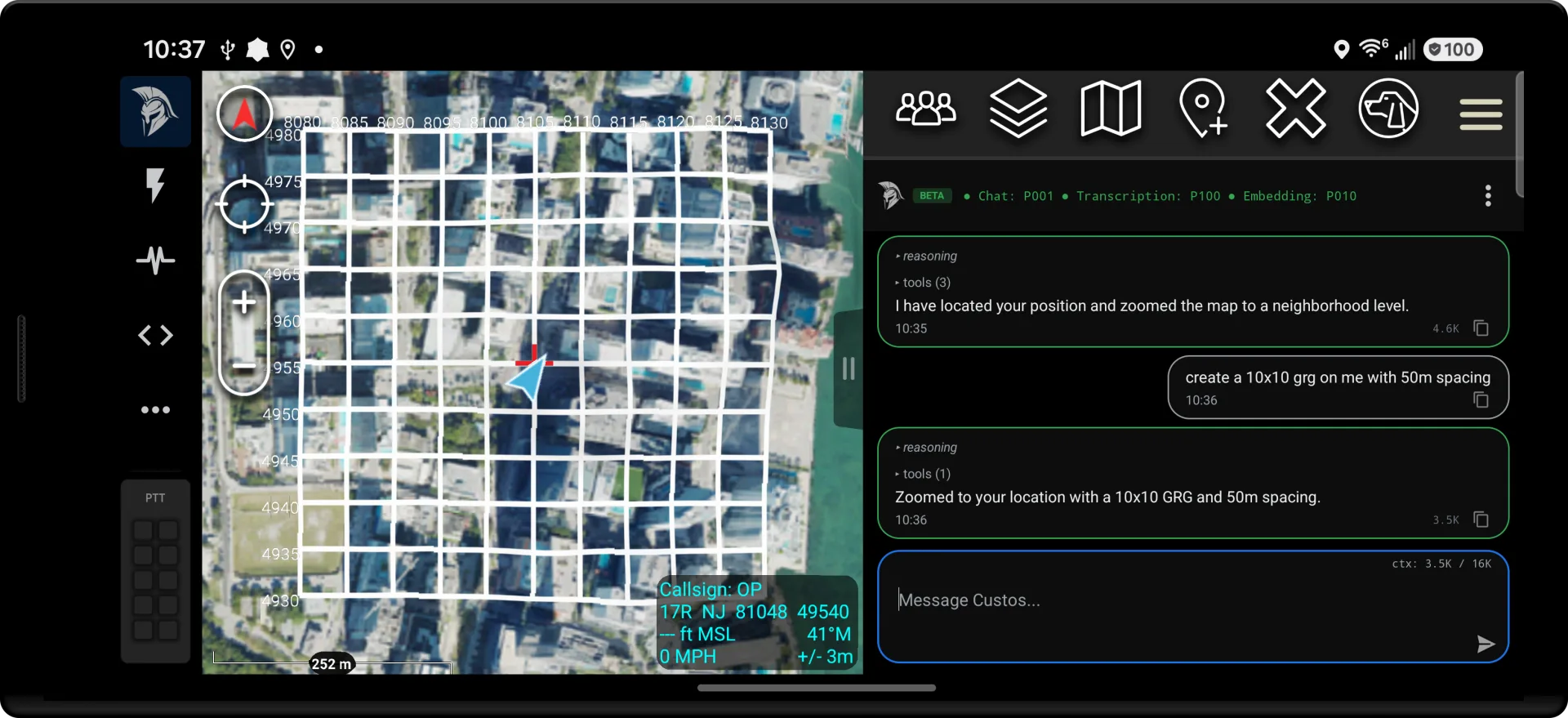
NimbusXR’s AI plugin for ATAK, named for the Latin custos, meaning guardian. Use voice commands to work with the map and automate field tasks, with models on your device and Lua skills your team can edit. You set the rules for what the agent may do.

Design principles
AI tools inside ATAK
CUST/OS brings local AI, editable skills, and operator controls into ATAK. You choose the models and tools for your deployment, then adjust them as the mission changes.
Principle I
Edge-First
Use local models for chat and voice when the network is unavailable. Download them before deployment and choose skills that work with the data on your device.
Principle II
Customizable to the Mission
Write a Lua skill for a task, test it in ATAK, and share it with your team. Skills and YAML configuration can change without rebuilding the plugin.
Principle III
Operator Control
Set the tools the agent can use and the actions that require approval. Review requests before they run, stop work in progress, and inspect the audit record afterward.
A wildfire is advancing on Alder. Coordinate the search, move the village, and bring ground crews and water scoopers onto the fire.
ALDER VALLEY
CUST/OS · PORTRAIT WORKSPACE FICTIONAL EXERCISE
Protect the village, find the missing hikers, and coordinate the fire response.
On-device operation
Keep working when the network drops
Configure local providers before deployment so the agent can use the compute you carry.
Work through a lost connection
Distance, terrain, jamming, or a radio restriction can cut off remote providers. Local models and Lua automations can keep running on the handset. Tools that need a network still need a connection.
Control which providers receive context
The router checks provider classification settings against the operator’s configured level before sending a request. Security modes can also exclude remote tiers from provider selection.
Keep network delay out of local requests
On-device inference avoids a network round trip. Response time still depends on the model, hardware, and prompt. Test chat, tool calls, and voice on the device you plan to use.
Store conversations on the device
Conversation history, the audit database, and the vector store are kept locally. Standalone mode restricts model requests to handheld providers. Remote providers are optional and subject to your routing configuration.
Run models and edit skills in ATAK
The plugin includes local inference backends for chat, speech, and vision. Model files and skills live on the device. The built-in editor lets you inspect, change, and test skills in the field.
Six Compute Tiers
Choose where your models run
Assign each provider a tier to describe where it runs. Security modes filter those tiers, and taskPriority sets the order in which the router tries eligible providers. You can change either setting in the configuration.
Models running on the operator's phone or tablet. Local inference works without a network connection; model size and speed depend on the device.
Compute carried by the operator and connected by wire, such as a Jetson in a ruck over USB tethering. This tier lets you use additional hardware while keeping the inference link off radio.
A shared compute device carried by the squad. Operators can use its models while the device is reachable over the local network.
Compute installed in a vehicle, with access to vehicle power and cooling. If the connection is lost after dismounting, the router can try the next eligible provider.
A workstation reached through CoT delegation over the TAK mesh. The design keeps tool execution on the field device while the workstation runs the model. The transport is included in the APK; operation between two live devices has not yet been validated.
An optional internet-hosted provider. Requests leave the local network. Security mode and classification settings determine whether the router can select it.
Try the routing rules
Selected: handheld / priority 1
This simulation selects the eligible provider with the lowest priority number. It does not connect to these providers.
providers:
  - name: on-device
    tier: handheld       # trust category
    protocol: litert
    model: gemma-4-E2B-it
    taskPriority: 1      # fallback order

  - name: ruck-jetson
    tier: pack           # wired inference link
    protocol: openai
    url: http://127.0.0.1:8082
    taskPriority: 3

  - name: cloud-fallback
    tier: cloud
    protocol: anthropic
    model: claude-sonnet-4
    taskPriority: 100

security:
  mode: emcon  # allow handheld + pack providers
In this example, EMCON mode limits inference to the phone and wired pack. It filters provider selection; it does not turn off the device's radios.
Skills & Runtime
Write skills for the work ahead
Install the skills you need from the open-source starter kit or write your own. The MIT-licensed kit includes 44 skills and 101 tools you can inspect and adapt. Skills are installed separately from the APK, so your team controls which tools are available.
---
group: custos
name: markers
description: Place, find, and delete map markers
script_paths:
  - custos.markers/place_marker.lua
  - custos.markers/find_items.lua
  - custos.markers/delete_markers.lua
tags:
  - markers
  - map
  - navigation
examples:
  - "place a marker at 38.9, -77.0"
  - "drop a hostile marker"
  - "find all friendly markers"
---

# Markers

Tools for placing, finding, and querying markers on the ATAK map.

## Rules
- Confirm with the operator before deleting more than 5 markers.
- Use CoT type a-h-G (hostile), a-f-G (friendly), a-n-G (neutral).
A skill is a directory. SKILL.md describes it to the agent, and .lua files define its tools. The runtime limits script execution and access to ATAK APIs. Share the directory to distribute the skill.
Load skills from disk
Save a skill in /sdcard/atak/custos/skills/ and the runtime reloads it for the next agent turn. You can update skills without rebuilding the APK.
Edit inside ATAK
The built-in editor supports Lua, YAML, and Markdown. Open files in tabs, search within a file, review changes before saving, and inspect script errors alongside the code.
Ask for a skill, then test it
With custos.skill_creator installed, describe the task and the agent can draft a skill using the ATAK class index. Review the Lua and run its tests in the editor before sharing it with your team.
Automate routine checks with Lua
Run a script on a schedule, at an interval, or in response to an ATAK broadcast. For example, a monitor can check team positions without asking a model on each tick. A script can explicitly delegate to an agent when it needs model reasoning.
Configure specialist agents
Define a specialist with its own provider and instructions, then call it through delegate. The main conversation uses your configured provider order; specialist delegation is a separate tool call.
Operator controls
Set the rules and review the actions
Configure tool access and provider restrictions for your deployment. The runtime checks those rules during execution and records the result for review.
Tool rules
Rules in custos.yaml can allow or block tools, or require approval. Rules can also depend on the provider tier, such as requiring approval for communications tools when a remote model is in use.
Action approval
Tools have declared impact levels that determine approval requirements alongside your rules. Approval requests show the tool, arguments, impact, and reason for the action. Choose Approve, Deny, or Modify.
Script sandbox
The runtime restricts which Java APIs and filesystem paths scripts can use. Instruction and concurrency limits bound script execution.
Local audit record
Tool calls, approvals, model requests, delegations, and security events are recorded in SQLite. Database triggers block updates and deletes through ordinary application access. Inspect the record in ATAK or export it for review.
Provider restrictions
Choose from six security modes to control which compute tiers are eligible. Provider classification settings add a separate check before the router sends a model request.
Encrypted API key storage
API keys are stored in Android EncryptedSharedPreferences, backed by Android Keystore. YAML configuration refers to the stored keys, and Lua scripts have no binding for reading them.
Skill signature verification
In developmentSignature verification is in development. The verifier and configuration exist, but the skill loader does not yet enforce signatures. The requirePki setting does not currently block unsigned skills.
For your team
From mission planning to field use
Operators use the tools in ATAK. Engineers and deployment teams can adapt the skills, models, and rules to the equipment and procedures in use.
Operators
Use voice commands and map tools from the device you carry. Set up local models before deployment so those functions remain available without a remote inference connection.
Squad leaders
Ask for a team position check, review a proposed action, or set up a monitor for a chosen radius. Use the audit record to review which tools ran and which actions were approved.
Mission planners
Prepare grid placement, route checks, and mission preflight as Lua skills. Test the scripts before use and run recurring checks as scheduled or event-triggered automations.
Mission engineers
Write and test tools against ATAK APIs, then share the skill files with operators. Update those files independently of the plugin release.
Deployment teams
Choose models for your phones and nearby compute, set fallback order, and test behavior when links fail. Command-post delegation over CoT is also in development; it has not yet been validated between live devices.
Security reviewers
Inspect tool rules, sandbox limits, provider classification settings, and the local audit database. The security documentation identifies current limits, including skill signature verification that is not yet enforced.
Before you install
Plan your setup
The plugin, skills, and models are installed separately. Here is what you will need to configure before field use.
Install in ATAK
CUST/OS runs as an ATAK plugin. Check the setup guide for the required ATAK and Android versions.
Install CUST/OS and make your first tool callAdd your skills
The APK does not bundle skills. Install the starter kit, select the parts you need, or write your own Lua tools.
Browse the starter skillsConfigure a model
Choose a supported local model or connect a compatible provider. Set its tier and priority in custos.yaml.
Set up an on-device modelPrepare for offline use
Download model files and test local providers before losing connectivity. Remote providers are optional.
How on-device inference worksSet permissions
Review the tool rules and approval requirements for your deployment. Match provider classification settings to your data handling requirements.
Configure tool approvals and rulesTest on your equipment
Try voice, tool calls, and provider fallback on the hardware you will carry. Model speed and memory requirements vary by device.
Check tested models and known limitsGet started
Put CUST/OS to work in ATAK
Install the plugin from Google Play, add the starter kit, and configure a model. The setup guide walks you through your first conversation and tool call.